AT HOP Top Up: Online, Near Me, App & Auto Top-Up Guide
Anyone who’s ever dashed to a bus stop with a low AT HOP balance knows the sinking feeling of a reader that won’t beep. Auckland Transport’s tap-and-go card is the key to the city’s buses, trains, and ferries, but the top-up process can be surprisingly confusing. This guide cuts through the clutter to show you exactly how to add funds online, at a retailer, or through the app — and what to watch out for along the way.
AT HOP cards in circulation: over 2 million · Top-up methods available: online, at retailers, via app, auto-top-up · AT HOP retailers across Auckland: over 400 locations · Typical top-up processing time: online: 30 minutes; app: instant (NFC); retail: immediate
Quick snapshot
- Via AT HOP website (Auckland Transport (official transport authority))
- Requires card registration (Auckland Transport (official transport authority))
- 30 min delay before funds active (Auckland Transport (official transport authority))
- 400+ locations
- Pay by cash or eftpos
- Funds available immediately
- NFC-enabled phones only (Apple App Store (AT Mobile app listing))
- Instant loading (Apple App Store (AT Mobile app listing))
- Check balance on the go (Apple App Store (AT Mobile app listing))
- Set up in online account (Auckland Transport (official top-up page))
- Trigger at NZD $10 balance (Auckland Transport (official top-up page))
- Automatic credit card charge (Auckland Transport (official top-up page))
Six key data points capture the essentials of AT HOP card management — from the upfront cost to the time it takes for funds to land.
| Fact | Value |
|---|---|
| Card Cost | NZD $5 (refundable) (Auckland Transport (card purchase page)) |
| Minimum Initial Top-Up | NZD $10 |
| Online Processing Time | Up to 30 minutes (Auckland Transport (top-up terms)) |
| Retail Outlets | Over 400 in Auckland region |
| Auto Top-Up Threshold | NZD $10 |
| App Availability | Android (NFC supported), iOS (limited functions) |
How do I top up my AT HOP card online?
Creating an AT HOP online account
To top up online, you first need a registered card. Head to Auckland Transport’s AT HOP landing page and create a MyAT account. You’ll need your 16-digit card number (found on the back of the card) and an email address. Registration is free and required for any online top-up or auto top-up setting.
Adding funds via credit or debit card
Once logged in, select “Top Up” and enter an amount. The minimum top-up is NZD $10 (Auckland Transport (top-up minimum)). Payment methods include Visa, Mastercard, and Amex. The funds are not immediately available — they are loaded to your card the next time you tag on at an AT HOP reader or electronic gate.
Processing time for online top-ups
The official line from Auckland Transport: online top-ups are available “one hour after payment” and must be activated by tagging on. If you don’t tag on within 60 days, the transaction is cancelled and the payment refunded (Auckland Transport (refund policy)). This 60-day rule is a common gotcha — many users assume the funds are live immediately.
The implication: online top-ups are best done at least an hour before you travel, and don’t rely on them until you’ve tagged on.
Where can I top up my AT HOP card near me?
AT HOP retailer map and locations
Auckland Transport lists over 400 retail outlets across the region where you can buy and top up AT HOP cards. These include dairy shops, supermarkets, and selected service stations. The official Auckland Transport retailer map helps you find the nearest one. For example, the University of Auckland’s Kate Edger Information Commons has a Munchy Mart outlet that sells and tops up cards (AskAuckland (university help page)).
Top up at ticket machines and stations
AT HOP ticket machines are available at major train stations, ferry terminals, and the Auckland Airport terminals (both international and domestic). The international terminal machine is inside the Transport Hub near bus stop A; the domestic terminal machine is next to the AirportLink bus stop near door 4 (Auckland Transport (airport machines)).
Top up on buses and ferries
On buses, you can top up with cash only — exact change is required. Ferries also accept cash top-ups at the ticket office. These methods are immediate but less convenient if you’re short on time.
The catch: retail and on-board top-ups are instant, but they limit your payment options. Cash-only on buses means you need to carry notes.
What is the AT HOP top up number and how does the app work?
AT HOP card number location
Your card number is a 16-digit code printed on the back of the card. You’ll need it to register online, set up auto top-up, or use the app. Write it down or take a photo — losing your card means losing the balance on that unregistered card.
Using the AT HOP app for NFC top-ups on Android
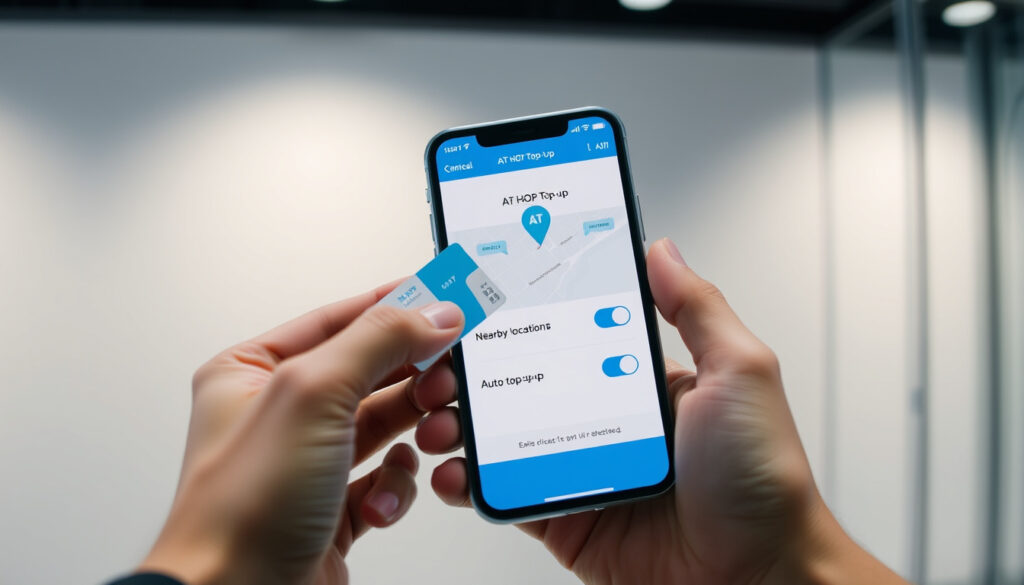
The AT Mobile app (available on Apple App Store (AT Mobile for iOS) and Google Play) lets you check your balance and find nearby top-up spots. On Android phones with NFC, you can perform instant top-ups by tapping your card against the phone’s NFC reader. This is the fastest method — no 30-minute wait, no queue at a retailer.
Setting up auto top-up
Auto top-up is a lifesaver for regular commuters. Set it up in your MyAT account: choose a minimum balance (default is NZD $10) and a top-up amount. When your card balance drops below the threshold, it automatically charges your credit card. You can also set an end date if you’re only using the card temporarily (Auckland Transport (auto top-up settings)).
Why this matters: auto top-up removes the mental load of checking your balance, but it only works if your card is registered and you have a payment method stored.
Where to buy an AT HOP card and how to check my balance?
Buying a card at retail outlets
AT HOP cards cost NZD $5, which is refundable if you return the card. You can buy them at the same 400+ retail outlets, at ticket machines, and at Auckland Airport. The initial top-up must be at least NZD $10 (Auckland Transport (card purchase terms)).
Loading initial value
When you buy a new card, you can load the initial value at the point of sale. Retailers accept cash and eftpos. If you buy online, the card is shipped with zero balance, so you’ll need to top up separately.
Logging into My AT HOP to view balance and transaction history
Your balance can be checked online via MyAT, at ticket machines, or by tagging on at a reader. The AT Mobile app also shows your balance. For a full transaction history, log into MyAT. This is particularly useful for tracking auto top-ups and spotting any missed charges.
The trade-off: online balance updates are delayed until you tag on, so don’t rely on the app for real-time accuracy after a top-up.
How to Top Up Your AT HOP Card: Step-by-Step
Whether you’re a first-time user or a seasoned commuter, these steps cover the most common top-up scenarios.
- Online top-up: Register your card at MyAT, log in, select “Top Up”, enter amount (min NZD $10), pay with credit/debit card. Tag on at a reader within 60 days to activate funds.
- Retail top-up: Find a nearby retailer using the Auckland Transport retailer map. Hand over your card and cash/eftpos. Funds are available immediately.
- App top-up (Android NFC): Download AT Mobile, log in, place your card on the phone’s NFC zone, select amount, confirm payment. Instant activation.
- Auto top-up: In MyAT, enable auto top-up, set minimum balance (e.g., NZD $10) and top-up amount. Your card will be topped up automatically when the balance falls below the threshold.
The pattern: online requires planning, retail is instant but limited to cash/eftpos, app is fastest but Android-only for NFC, and auto top-up is the set-and-forget solution.
Confirmed Facts
- Online top-ups require a registered card and a minimum of NZD $10. (Auckland Transport (top-up requirements))
- AT HOP card costs NZD $5 and is refundable. (Auckland Transport (card purchase))
- Auto top-up is available for registered cards. (Auckland Transport (auto top-up))
- Online top-up funds are activated when the card is tagged on at a reader. (Auckland Transport (activation process))
- AT HOP card machines are available at Auckland Airport terminals. (Auckland Transport (airport machines))
What’s Unclear
- Exact count of retail outlets (official maps vary). (AskAuckland (university help page) mentions outlets but not count)
- Whether international credit cards always work for online top-ups. (No official statement from Auckland Transport)
Online top-ups are the most flexible but come with a 30-minute activation delay and a 60-day expiry. For commuters who travel daily, auto top-up eliminates the guesswork — but only if you remember to register your card first.
Online top-ups are available one hour after payment and must be activated by tagging on at an AT HOP reader.
— Auckland Transport Help Desk (Auckland Transport (official statement))
During the AT HOP restoration period, customers could top up at customer service centres including Waitematā (Britomart) and Downtown, and most ticket machines were available.
— Scoop NZ report on system restoration (Scoop NZ (news outlet))
For Auckland commuters, the choice of top-up method is a trade-off between speed, convenience, and payment flexibility. Online top-ups work best for planned trips, while retail and app top-ups are better for spur-of-the-moment needs. The auto top-up feature is the clear winner for regular users — but only if you have a registered card and a reliable payment method saved.
Related reading: Find AT HOP top-up spots near me
at.govt.nz, aucklandtourism.org, teuscherfifthavenue.com, facebook.com, at.govt.nz, at.govt.nz, blog.naver.com, heyheyz.net
For a step-by-step breakdown of every reload method, the official AT HOP top-up guide offers clear instructions for both online and in-person options.
Frequently asked questions
Can I use my AT HOP card on the ferry?
Yes, AT HOP cards are accepted on all Auckland Transport ferries. You can top up at ferry terminal ticket machines or at the ticket office.
Is there a fee for using a credit card to top up?
No, Auckland Transport does not charge any additional fee for credit or debit card top-ups. The only charge is the top-up amount you select.
How do I get a refund for my AT HOP card balance?
You can request a refund by returning your card to an Auckland Transport customer service centre. The NZD $5 card cost is refundable, and the remaining balance is returned minus a small admin fee. Refunds are processed within 10 working days.
What happens if my card is lost or stolen?
If your card is registered, you can report it lost and transfer the balance to a new card. Unregistered cards cannot be recovered. Always register your card as soon as you buy it.
Can I top up someone else’s AT HOP card?
Yes, as long as you have the card’s 16-digit number and the card is registered. You can top it up online through MyAT or at a retail outlet.
Does my AT HOP card expire?
AT HOP cards do not expire, but if you don’t use the card for 12 months, the balance may be subject to an inactivity fee. Check the terms on the Auckland Transport website.
More related posts
 Invercargill to Auckland Flights: Time, Price & Airlines (2025)
 How to Measure Ring Size at Home: Charts, Apps & Guide
 Prime Numbers 1 to 100: Definition, List, Examples & Tricks
 How Many Weeks in a Year? 52 or 53? The Exact Answer
 Trade Me Book a Courier: How to Book, Prices, Tracking & More
 A Knight of the Seven Kingdoms Episode 5: Recap & Rating
 EB Games Closing Down: NZ Shutdown & 2026 Store Closures
 Real Madrid vs Valencia CF Lineups – Confirmed XIs Injuries News